How to Make Text Undetectable by AI Detectors (Step-by-Step Guide)
Learn how to humanize AI text and pass detection with Detect.ai’s Paraphraser. Follow this step-by-step guide to create undetectable, authentic content.
As AI-generated content continues to rise, writers, marketers, and creators are constantly asking one question: How do I make my content sound more human and less like a robot wrote it?
Undetectable content has become really important in SEO, content marketing, and even for social trust.
Fortunately, Detect.ai provides a powerful solution, the AI Paraphraser. It helps you rewrite AI-generated text into human-quality content that passes every detection test.
This article gives you a step-by-step guide on how to use the Detect.ai Paraphraser to humanize and make your content undetectable by AI detectors, while keeping it readable, engaging, and authentic.
Why Does AI Detection Matter?
AI detectors like GPTZero, Copyleaks, ZeroGPT, and others scan for patterns typical of machine-generated writing. These patterns include:
- Repetitive sentence structures
- Predictable vocabulary choices
- Lack of emotional nuance
- Over-formal or under-personalized tone
If your content gets flagged as AI, it can erode trust, lower SEO ranking, and damage brand authority. However, rewriting content manually is time-consuming. That’s where Detect.ai’s AI Paraphraser comes in.
Step-by-Step: How to Make AI Content Undetectable with Detect.ai
Here’s precisely how to use Detect.ai’s paraphraser to transform AI-generated text into natural, undetectable writing.
Step 1: Access the AI Paraphraser Tool
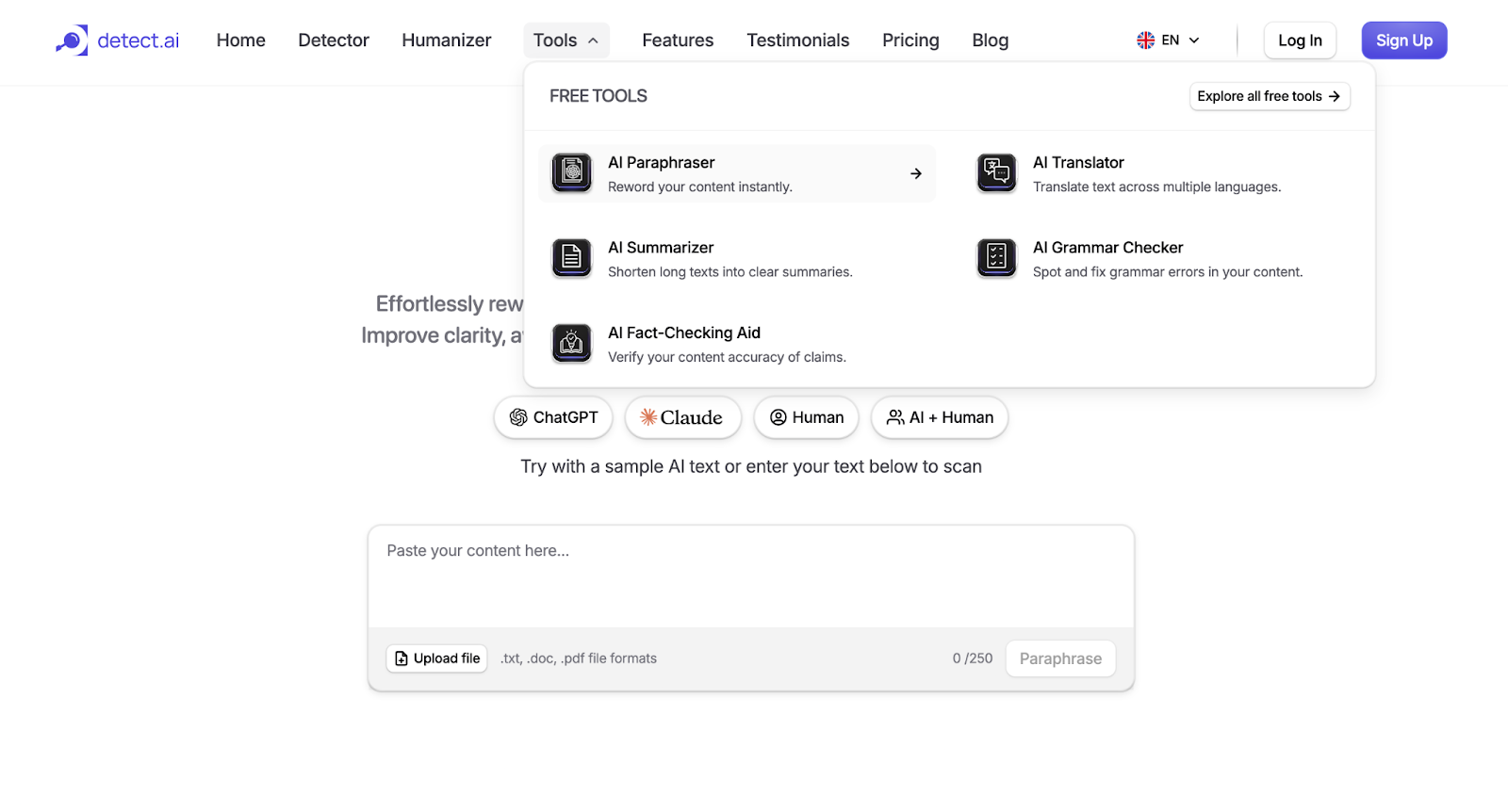
Go to Detect.ai, hover over the “Tools” tab on the top navigation bar, and select AI Paraphraser from the dropdown menu.
Alternatively, you can go directly to the AI Paraphraser page using the Tools section on the homepage.
Step 2: Paste or Upload Your Content
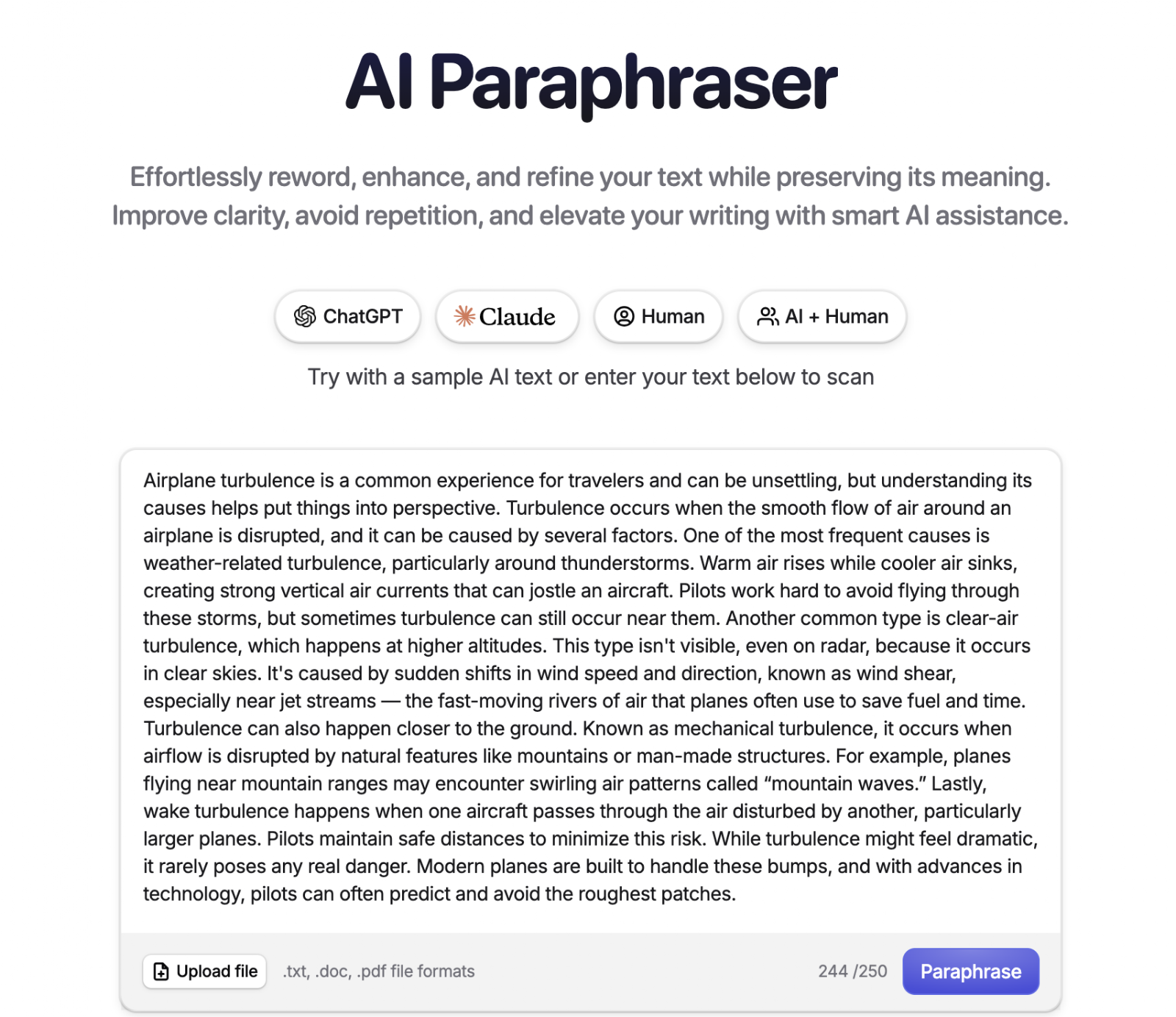
You have two options:
- Paste your text directly into the text box (up to 250 words per batch in the free plan)
- Or upload a file in .txt, .doc, or .pdf format.
This flexibility allows you to work with both short and long-form content.
Step 3: Choose the Detection Source (Optional)
Just below the paraphraser input field, you’ll see buttons labeled:
- ChatGP
- Claud
- Huma
- AI + Human
These help train the tool to detect and transform patterns based on where the content originated. If you're unsure, “ChatGPT” is a safe default for most AI-generated content.
Step 4: Click “Paraphrase.”
Once your content is in place, click the “Paraphrase” button.
In a few seconds, you’ll see a split screen:
- The original content on the left
- The humanized output on the right
Detect.ai intelligently restructures sentences, rephrases ideas, and adjusts tone to reflect natural human writing, all without distorting your original meaning.
Step 5: Review and Adjust the Output Mode (if needed)
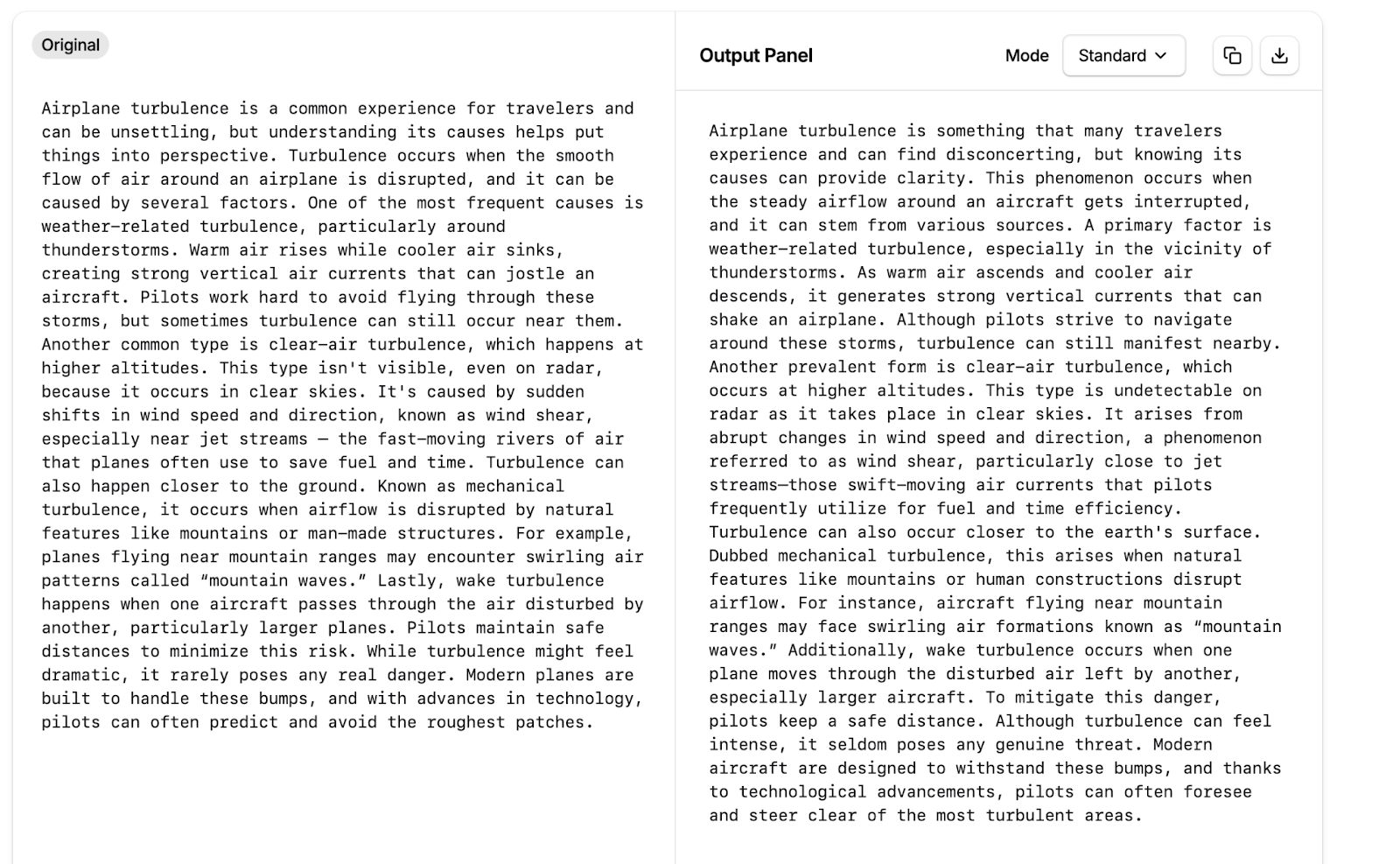
On the output side, you’ll find a dropdown labeled “Mode” (e.g., Standard).
You can adjust this to experiment with more aggressive or subtle rewriting styles. For instance:
- “Standard” offers balanced paraphrasing
- “Creative” might add more variation or flair (Pro version may unlock more options)
Step 6: Run AI Detection Check
After paraphrasing, click the “Check for AI” button to test how “human” your new text appears. Detect.ai will:
- Score your content (e.g., “85% Human”
- Show which phrases are most AI-detectable
- Provide results across multiple major detection engines: GPTZero, Copyleaks, ZeroGPT, Writer, Spaling AI, and Crossplag
This feature alone sets Detect.ai apart. You’re not just rewriting text—you’re verifying it against the exact systems likely to flag it.
Step 7: Download or Copy Your Humanized Text
Once satisfied with the score and the new version, you can:
- Copy the text using the copy button
- Or download it as a document (click the download icon)
You now have polished, AI-undetectable content ready to use anywhere, blog posts, emails, LinkedIn articles, newsletters, and more.
Does It Really Work?
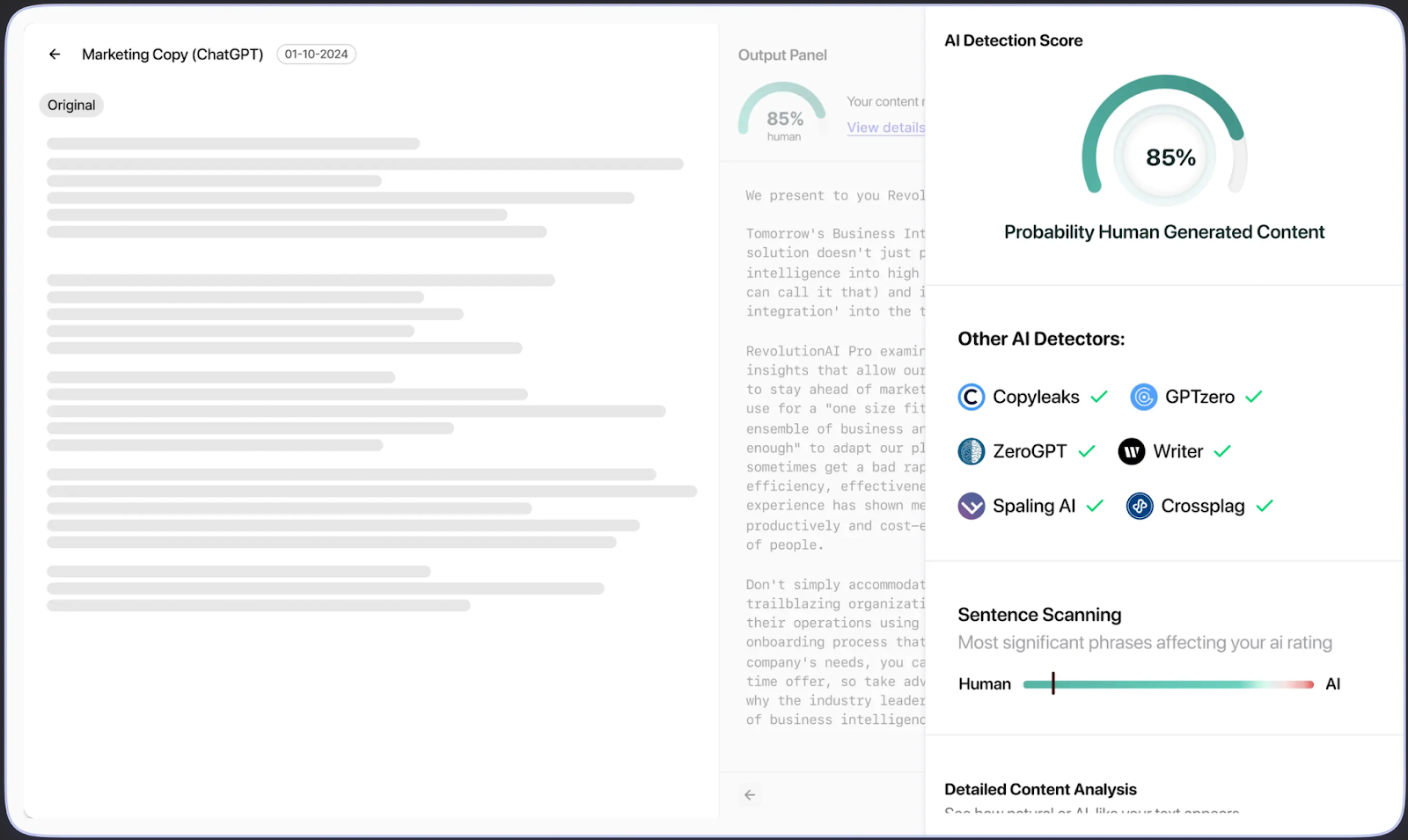
Yes, here’s the proof.
From the screenshots, a ChatGPT-generated paragraph originally scored as highly detectable AI content. After using Detect.ai’s Paraphraser:
- The content’s structure became more varied
- Vocabulary improved without sounding forced
- The human-likeness score rose to 85%
- All major AI detectors returned a “Pass”
This shows Detect.ai does more than swap synonyms; it truly rewrites with nuance.
Best Practices for Even Better Results
While Detect.ai does most of the heavy lifting, here are four simple ways to improve your results:
- Use Smaller Chunks (Under 250 words): Shorter inputs often yield higher-quality rewrites. Break longer text into parts for better paraphrasing.
- Add a Human Touch Post-Output: Tweak the paraphrased result slightly. Add anecdotes, humor, or your personal tone to give the content an unmistakable human flavor.
- Avoid Re-pasting AI Text Verbatim: Before paraphrasing, change obvious formatting or introductory lines like “In this article, we’ll…” to reduce detector sensitivity.
- Use “AI + Human” or “Human” Option Before Paraphrasing: These pre-labels subtly shift how Detect.ai interprets the content and improve naturalness in the rewrite.
Why Detect.ai Stands Out
Unlike other platforms, Detect.ai doesn’t just rewrite content—it rewrites with purpose: to pass AI detection tools without compromising quality.
It combines:
- Smart rewording
- Detection engine compatibility
- Human-like tone and structure
- Downloadable output and real-time scoring
All within a clean, intuitive interface.
Final Thoughts
AI can help you generate fast content. But to truly connect with readers and to pass AI detection tools, you need more than just automation. You need smart refinement.
That’s exactly what the Detect.ai Paraphraser offers: a fast, reliable, and intelligent way to make AI content feel undeniably human.
Use it to polish your work, strengthen your message, and protect your credibility, without burning hours on manual rewriting.
Try it yourself: Visit Detect.ai and Paraphrase Your Text Now